Skip to product information
1 of 4

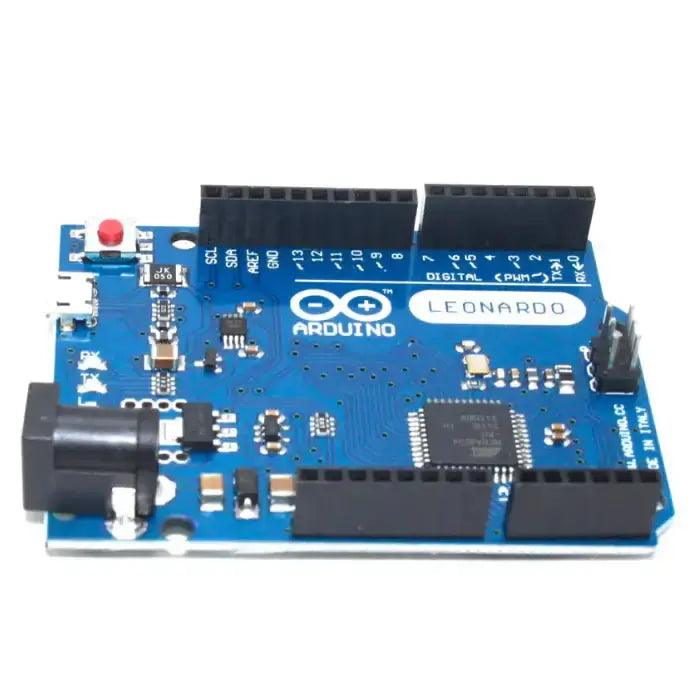
Arduino Leonardo R3 compatible board

SKU: BZP2IJVYB2
The Leonardo R3 Micro-USB Arduino Compatible Board is a versatile microcontroller development board built around the powerful ATmega32U4 microcontroller. Designed for flexibility and ease of use, it offers 20 digital input/output pins, including 7 PWM outputs, and 12 analog input pins for reading sensor data and controlling external devices. The board operates with a 16 MHz crystal oscillator, ensuring stable...
Regular price Rs. 549.00
Regular price Rs. 699.00 Sale price Rs. 549.00
Save Rs. 150
Sold out
Tax included. Shipping calculated at checkout.

Shipping & Returns

Orders placed before 3 PM IST will be shipped on the same day (excluding Sundays and Public holidays) through our shipping partners. In rare cases, the pickup may get delayed during Public holidays / Bandh / Environmental disturbances.

Specifications

Specifications:

Microcontroller: ATmega32U4
Board Type: Leonardo R3 (Arduino Compatible)
Operating Voltage: 5V
Recommended Input Voltage: 7V – 12V
Input Voltage Limits: 6V – 20V (absolute limit)
Digital I/O Pins: 20
PWM Output Channels: 7
Analog Input Channels: 12
Clock Speed: 16 MHz
Flash Memory: 32 KB (4 KB used by bootloader)
SRAM: 2.5 KB
EEPROM: 1 KB
USB Interface: Native USB (built into ATmega32U4)
USB Type: Micro-USB
Communication Protocols: UART, SPI, I2C (TWI)
DC Current per I/O Pin: 20 mA
3.3V Output Current: 50 mA
Onboard Voltage Regulator: Yes
Reset Button: Yes
ICSP Header: Available
Dimensions: 5 × 4 × 1 cm
Weight: 10 grams

Additional Resources

FAQ

1. What is the Arduino Leonardo?

The Arduino Leonardo is a microcontroller development board built around the ATmega32U4 microcontroller. It is part of the Arduino family and is widely used for electronics prototyping, embedded systems, and interactive projects due to its simplicity and flexibility.

One of its standout features is native USB support. Unlike many other Arduino boards, the Leonardo’s main microcontroller includes built-in USB communication. This allows the board to connect directly to a computer using a standard USB cable for programming, debugging, and data communication. It can also emulate USB devices such as a keyboard or mouse.

The Leonardo provides 20 digital input/output pins and multiple analog input pins, enabling easy connection of sensors, motors, displays, and other electronic components. Its combination of I/O capability and native USB functionality makes it ideal for both beginner and advanced projects.

2. Is the Arduino Leonardo discontinued?

The production status of the Arduino Leonardo may vary depending on region and distributor availability. Arduino periodically updates its product lineup and introduces newer boards with enhanced features. In some markets, the Leonardo may be less commonly stocked compared to boards like the Uno or Mega.

To confirm current availability, it is best to check the official Arduino website or authorized distributors. Even if availability fluctuates, Leonardo-compatible boards are often still available through third-party manufacturers.

If you are considering alternatives, boards such as the Arduino Uno or Arduino Mega offer similar functionality, although they do not provide the Leonardo’s native USB HID capability.

3. Is Arduino Leonardo better than Arduino Uno?

Whether the Leonardo is “better” than the Uno depends on the specific requirements of your project. Both boards are powerful and widely used, but they have some important differences.

The Leonardo is based on the ATmega32U4 microcontroller, while the Uno uses the ATmega328P. The ATmega32U4 includes built-in USB communication, allowing the Leonardo to function as a USB device (keyboard, mouse, etc.) without additional hardware. The Uno requires a separate USB-to-serial converter chip for communication.

In terms of I/O, the Leonardo offers 20 digital pins compared to the Uno’s 14 digital pins. The number of analog inputs also differs slightly depending on configuration. However, the Uno remains more commonly used in beginner projects due to its widespread documentation and shield compatibility.

Ultimately, the Leonardo is better suited for projects requiring native USB functionality, while the Uno is often preferred for general-purpose applications and beginners.

4. Is Arduino Leonardo a good choice?

Yes, the Arduino Leonardo is an excellent choice for many types of projects. Its built-in USB capability makes programming simple and enables advanced USB-based applications such as custom keyboards, game controllers, and automation tools.

Key advantages include:

  • Native USB communication without a separate USB-to-serial chip
  • Ability to emulate USB devices like keyboard and mouse
  • Ample digital and analog I/O pins for sensor and actuator interfacing
  • Compact size suitable for embedded projects
  • Full compatibility with the Arduino IDE

Because of these features, the Leonardo is particularly useful for interactive installations, USB automation devices, robotics, and custom input device projects.

View full product details

The Leonardo R3 Micro-USB Arduino Compatible Board is a versatile microcontroller development board built around the powerful ATmega32U4 microcontroller. Designed for flexibility and ease of use, it offers 20 digital input/output pins, including 7 PWM outputs, and 12 analog input pins for reading sensor data and controlling external devices. The board operates with a 16 MHz crystal oscillator, ensuring stable and reliable performance for a wide range of embedded applications.

The Leonardo R3 comes equipped with a Micro-USB port for programming and power, a DC power jack for external supply, an ICSP header for direct programming, and a dedicated reset button. It includes all the essential components required to run the microcontroller, meaning you can start developing immediately by simply connecting it to a computer via USB or powering it with an AC-to-DC adapter or battery.

One of the key advantages of the Leonardo R3 is its ATmega32U4 microcontroller with built-in USB communication. Unlike earlier Arduino boards that require a separate USB-to-serial converter chip, the Leonardo handles USB communication directly through its main microcontroller. This unique feature allows the board to emulate USB devices such as a keyboard or mouse when connected to a computer. In addition to appearing as a virtual (CDC) serial/COM port, it can send keyboard strokes and mouse movements, making it ideal for HID (Human Interface Device) projects.

Arduino Leonardo Pinout

Because of this integrated USB capability, the Leonardo behaves slightly differently from other Arduino boards in terms of programming and serial communication. However, it remains fully compatible with the Arduino IDE and supports the majority of standard Arduino libraries and shields.

Overall, the Leonardo R3 Micro-USB board is an excellent choice for developers working on automation systems, USB device emulation projects, robotics, interactive installations, and advanced embedded applications that require native USB functionality.